
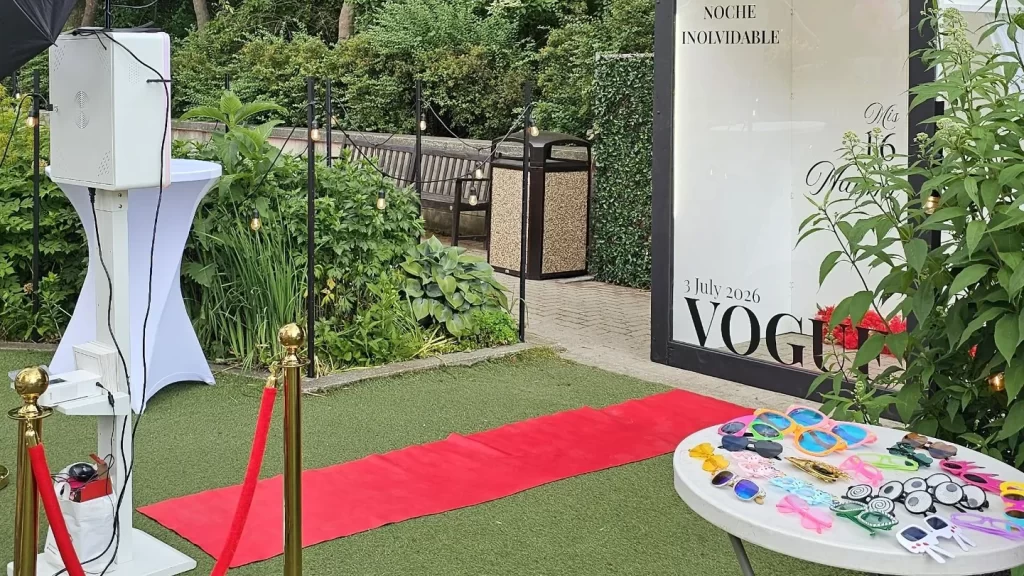
A company picnic photo booth should work for a daytime crowd that moves between food, games, conversation, and family activities. Plan a stable, weather-appropriate location, choose an output guests can collect easily, and keep the station welcoming for both employees and invited family members. The booth should be one comfortable activity in the day, not a compulsory team exercise.
Begin with the corporate photo booth options and describe the picnic venue, guest mix, and programme. A Toronto park gathering, a private outdoor venue, and an office courtyard event have different access and operating conditions. The supplier needs the actual location and proposed setup, not simply the word “outdoors.”
Define who the picnic is for
Some company picnics are employee-only; others welcome partners, children, or extended family. Decide who is invited before choosing the booth prompts and visual design. A department-focused joke may make sense to staff but leave family guests feeling excluded.
A broad event greeting and the company identity can connect everyone to the day without requiring insider knowledge. Offer employee team portraits if wanted, but leave plenty of time for friends and families to choose their own groups. The picnic should allow people to participate on their own terms.
Ask the organiser about accessibility and participation needs early. The photo experience may need a seated option, a quieter period, or a particularly clear approach route. Confirm what the selected equipment can accommodate rather than assuming that an outdoor location automatically provides suitable access.
Choose a reliable location before choosing decor
Find the practical operating area first. The supplier needs an agreed surface, suitable protection from weather, power arrangements, and enough clearance for the equipment and guests. A scenic patch of grass may look attractive but still require a different setup or an alternative location.
Describe the surface accurately and send photographs from several directions if useful. Include the path from unloading to the station. Slopes, steps, soft ground, narrow gates, and long distances can affect how equipment reaches the area even when the photo corner itself looks spacious.
Do not assume a tent is suitable simply because it provides shade. The supplier and venue should confirm its position, protection, and compatibility with the booth. Wind, rain, direct sun, and changing light all need to be considered as part of the actual plan.
Set a clear weather decision process
Choose an approved alternative before the event, such as an indoor room or another supplier-approved location. The alternative needs its own access and space check. A weather plan is not complete if it only says that everyone will move somewhere under cover.
Name the person who decides whether the booth uses the primary or alternative location and agree on when that decision is made. The supplier needs enough notice to set up in the right place. Several organisers should not send competing instructions as conditions change.
If the entire picnic programme changes, communicate the updated operating hours as well as the location. A booth arranged for the afternoon does not automatically shift to a morning indoor event. Confirm the revised plan with the supplier before telling guests it is settled.
Place the booth between activities, not in their way
Guests should be able to notice the station while moving around the picnic. At the same time, the queue should not cross a game area, food-service line, vehicle route, or main path. Look at how the event will function with people present, not just where equipment fits on a map.
Keep enough separation from sports and active games that equipment and waiting guests are not exposed to balls or running participants. Ask the organiser which activities may move during the day. A space that is quiet during setup may become a competition area later.
A location near seating can be convenient for families, but it should not force seated guests to become the background of every portrait. The backdrop and camera direction need to be agreed. Consider where the sun and nearby activity will be during the booked hours, not only at the moment the organiser visits.
Choose an output that suits a picnic
A print is a tangible keepsake, but guests need a practical way to protect and carry it while eating or playing games. A digital image may be convenient for a mobile crowd. A photo keychain offers a different physical favour and requires its own quantity and collection plan.
| Picnic priority | Output to consider | Question to settle |
|---|---|---|
| A family keepsake | A printed portrait | Where can guests keep the print safely? |
| A light-touch activity between games | A digital photo | How will files be shared at this location? |
| A physical event favour | A photo keychain | How many pieces and who manages collection? |
| A lively employee activity | A video booth, where suitable | Does the venue meet the operating requirements? |
Confirm connectivity and file-sharing arrangements for the actual venue. Do not promise instant delivery everywhere just because guests will have phones. Ask what happens if the local connection is unreliable and how guests receive their files afterwards, if an alternative process is needed.
Keep the design friendly to the whole guest list
A company picnic template can use the event name, date, and approved logo without becoming a recruiting advertisement. Keep the portrait area generous and the text readable. Family members may keep the photograph for personal reasons even if they do not work for the company.
If departments want their own photographs, use a common design and organise groups through a host. Changing the artwork for every department adds an operational task that may not help the guest experience. Ask the supplier before planning multiple versions.
Choose props with the audience in mind. A small selection of cheerful signs can work, while job-specific jokes or performance targets may feel out of place at a relaxed social event. Guests should also be able to take a photograph with no props at all.
Coordinate with games and announcements
List any welcome remarks, team games, prize presentations, or meal periods that may draw most guests away. Use those points to decide when the booth is most useful. A continuous booking can still include quieter periods, but the organiser should understand when guests are likely to participate.
If a scheduled team photograph is important, gather the group before its turn and keep the request limited. Employees may be spending the day with family or moving between activities. Avoid repeatedly pulling the same people out of games to create every possible department combination.
Give the attendant the event contact and the programme cues. If an activity runs late or a weather decision changes the order, one person should communicate the update. The booth does not need to control the picnic timetable, but it should not be left operating from an obsolete version.
Make children’s participation straightforward
When families are invited, a parent or responsible adult should help children decide whether and how to participate. The booth attendant runs the photo experience; the station should not be treated as childcare while adults join another activity.
Keep instructions simple and make room for family groups to gather before entering. A child may be more comfortable taking a photograph with a familiar adult or choosing a plain portrait without props. Avoid making participation part of a compulsory contest or a public performance.
Agree on gallery access and public image use before the event. The organiser should give the supplier clear instructions about family photographs and any publication choices. A picnic album for attendees and a company advertising campaign are different uses that should not be blurred together.
Give the supplier a realistic access brief
Provide the exact meeting point, vehicle access arrangements, unloading location, and contact number for the day. A park or large outdoor venue may have several entrances. The address alone may not identify the gate closest to the agreed station.
Confirm any venue requirements with the people responsible for the booking. Do not tell the supplier that vehicles can drive to the photo area unless the venue has agreed. Include the distance and route equipment must travel after unloading.
Arrange a clear pack-down route too. Guests, picnic tables, and game equipment may occupy spaces that were empty during setup. An organiser should keep the agreed route available so equipment can leave without crossing an active activity or disrupting guests unnecessarily.
A sample plan for a family company picnic
Imagine an afternoon event with arrivals, lunch, optional games, and a short prize presentation. The booth opens after the initial welcome, when guests have found their tables. It remains an optional activity between games, then pauses for the presentation if the station would distract from the announcement.
In this example, a host gathers a few department portraits at an agreed time while families can use the booth freely during the rest of the booking. The design includes the picnic name and date. The organiser has already approved an indoor alternative and a method for distributing the private gallery.
The supplier receives the access route, surface description, power plan, and weather decision contact. The event team manages games and children, while the attendant manages the booth. This division keeps the photo experience clear without asking it to become the centre of every part of the picnic.
Keep the end of the day organised
Guests may leave in small groups rather than all at once. Explain the booth’s closing time while there is still a reasonable chance to participate, and keep the collection point visible for any physical keepsakes. Assign an organiser to take responsibility for items that remain after the station closes.
After the picnic, review practical observations rather than treating every photograph as a measure of employee engagement. Note whether families could find the station, whether the location stayed comfortable, and whether the chosen output was convenient. A session count can describe booth use, but it cannot explain how every employee felt about the day.
Save the final access notes and weather decision record with the event plan. If the same venue is used again, those details can help the next organiser ask better questions. Recheck them before a future booking because the layout, venue rules, or chosen equipment may change.
Review the plan against the quote
Check the operating hours, output, setup location, alternative location, and any favour quantity. Make sure the quote describes the event you have planned rather than a standard indoor reception. The rental cost guide explains the main variables, and the GTA travel and setup guide helps organise access details.
For the photographic requirements, use the space and inclusions guide. For an employer event with more formal branding, the company-event planning guide covers how the design can support the wider experience.
Before the picnic, confirm one final version of the location, programme, and weather plan with the venue and supplier. Send those details, the guest mix, and preferred output through the quote request form. A well-planned picnic booth gives people a relaxed photo opportunity while leaving plenty of room for the rest of the day.